

Lead qualification decides where your reps spend their limited selling time, and the math is stark. Sales reps spend only 28% of their week actually selling, which means every unqualified demo, tire-kicker, or misrouted lead eats into the tiny slice of the calendar that moves pipeline. Good qualification protects that time. It filters for fit, intent, and budget so your team talks to people who can realistically buy, not everyone who filled out a form or handed over a business card.
In this guide, we’ll unpack what ‘qualified’ really means, how to pick a framework, how to score and disqualify leads, and how to keep marketing and sales aligned in practice. Then we’ll bring it to the event floor, where your qualification choices meet messy, real-life conversations – and where most teams still leak the most revenue.
Key Takeaways
- A ‘qualified lead’ is less about perfect scoring and more about a clear, written rule for who actually earns sales time.
- Framework choice should follow your typical deal size and cycle – ignore whatever acronym is trending this quarter.
- High disqualification rates usually mean you’re respecting calendars – think of DQ as a focus tool, rather than a failure.
- The fastest wins often come from fixing the MQL > SAL > SQL handoff.
- Event leads are where qualification, AI enrichment, and instant follow-up collide – exactly the gap Romify’s event revenue engine is built to close.
What Lead Qualification Does
Lead qualification is the filter between anyone who raised a hand and people your reps should actually talk to. It evaluates fit, need, budget, authority, and timing so you can prioritize conversations that have a real chance of turning into revenue, instead of burning cycles on no-hope deals.
A qualified lead has a clear problem you solve, operates in your ideal customer profile, has access to money, can influence a decision, and is working within a realistic buying window.
Most B2B teams describe this journey using four common labels: MQL, SAL, SQL, and PQL:
- A Marketing Qualified Lead (MQL) meets your basic criteria on paper and in behavior based on fit, need, budget, authority, and timing. For example, the right industry and company size plus repeated engagement with emails, content, or events. The MQL tells marketing ‘we’ve seen enough to pass this along’.
- A Sales Accepted Lead (SAL) is the checkpoint where sales agrees to take ownership. It doesn’t add new data, but creates accountability. Someone in sales reviews the MQL, accepts or rejects it, and logs that decision so both teams see the same funnel.
- A Sales Qualified Lead (SQL) is where a rep has confirmed real buying intent. At SQL, you’ve validated that there’s a concrete pain, a project or initiative in play, an indicative budget, and someone with influence over the deal. SQLs typically convert to closed-won deals at a far higher rate than raw leads, which is why they’re the unit many revenue teams anchor forecasts on.
- A Product Qualified Lead (PQL) takes a different route. Instead of engaging with marketing, the lead has used your product (usually via trial or freemium) and hit an activation milestone that suggests real intent. This could be inviting teammates, connecting a CRM, or reaching a usage threshold.
|
Stage |
Definition |
|
|
MQL |
Marketing-qualified. Meets firmographic and behavioural thresholds. |
Lead to MQL ~31% B2B, 39% SaaS. |
|
SAL |
Sales-accepted. The checkpoint between marketing and sales. |
Accountability gate, varies by team. |
|
SQL |
Sales-qualified. Need, authority, budget signal, timeline confirmed. |
MQL to SQL 13–21%. |
|
PQL |
Product-qualified. Trial user hit activation threshold. |
Specific to product-led growth. |
Why SAL Is the Stage Most Teams Skip
SAL is the least glamorous stage, which is exactly why it gets ignored. Without it, marketing celebrates MQL volume while sales quietly cherry-picks only the leads they like and discards the rest without a trace. That gap poisons trust and makes it almost impossible to debug conversion issues, because no one knows which leads were actually worked.
Building SAL into your CRM fixes that. Create a required step where every MQL is either accepted or rejected within a set window, ideally 24-48 hours after handoff. Accepted SALs move forward as active opportunities, while rejected ones get a reason code that marketing can analyze and act on.
“The result is simple – one shared number at the handoff gate, faster feedback loops, and far fewer ‘we sent great leads’ versus ‘we never saw them’ debates.”
– Ben Jablow, Romify CEO
The Qualification Frameworks You Need to Know
Lead qualification frameworks give your team a repeatable way to decide who deserves sales time and what to ask next. Five models show up again and again in B2B sales: BANT, CHAMP, MEDDIC/MEDDPICC, FAINT, and SPICED.
Each one shines with a different deal size, buying process, and sales motion, so the goal isn’t to pick the best but to match the framework to your typical deal shape.
1. BANT
BANT (Budget, Authority, Need, Timeline) came out of IBM in the 1960s and was built for fast, transactional deals where one person makes the call. It focuses on four questions: Do they have budget, are we talking to the right person, is there a real problem, and when will they decide. It works well for sub‑$10K deals with cycles under 30 days where reps need a quick yes/no answer, and lifting conversion is mostly about filtering out obvious non‑buyers early.
2. MEDDIC and MEDDPICC
MEDDIC (and its extended cousin MEDDPICC) is the enterprise standard for long, complex cycles with committees and procurement in the mix. It adds more structure: Metrics, Economic Buyer, Decision Criteria, Decision Process, Identify Pain, Champion, plus Paper Process and Competition in the extended version. It’s designed for deals over $50K, with six or more stakeholders and cycles longer than 90 days, where missing one internal influencer or legal step can stall a deal for months.
3. CHAMP
CHAMP stands for Challenges, Authority, Money, Prioritization and flips the order of BANT by putting the customer’s problem ahead of budget. It fits consultative mid‑market sales where uncovering pain and impact matters more than ticking boxes. It tends to work best for $10K-$50K deals with 30-90‑day cycles, where the rep needs a richer discovery conversation but still wants something lighter than full-blown MEDDIC.
4. FAINT
FAINT (Funds, Authority, Interest, Need, Timing) was built for outbound, where prospects rarely have a pre-approved line item for your product. Instead of asking ‘do you have budget?’ it asks whether the company has the financial capacity to act if you create enough interest. It’s a better fit for $10K-$100K outbound motions that require real demand creation, where your job is to make the problem large enough to earn budget.
5. SPICED
SPICED stands for Situation, Pain, Impact, Critical Event, Decision and revolves around the moment that forces action. The framework digs into what’s happening now, what hurts, what happens if nothing changes, the deadline that makes this urgent, and how the decision will be made. It works well for $25K-$100K deals with 60-120‑day cycles, especially when a compliance date, funding milestone, or product launch drives timing.
|
Framework |
Deal size |
Cycle length |
Best fit |
|
BANT |
Under $10K |
Under 30 days |
SMB, inside sales, transactional |
|
CHAMP |
$10K–$50K |
30–90 days |
Mid-market, consultative |
|
MEDDIC / MEDDPICC |
Over $50K |
Over 90 days |
Enterprise, multi-stakeholder |
|
FAINT |
$10K–$100K |
30–90 days |
Outbound, no pre-set budget |
|
SPICED |
$25K–$100K |
60–120 days |
Consultative, event-driven |
Common Traps
Two mistakes cause most of the pain.
First, running MEDDIC on a small SMB deal overwhelms prospects with questions that feel heavier than the purchase itself, which kills momentum.
Second, running BANT on a $250K enterprise opportunity leaves you blind to the broader committee, internal politics, and paper process, so deals slip or die in procurement even when the initial champion says yes. Matching the framework to deal size keeps your discovery sharp instead of exhausting or shallow.
How to Pick the Right Framework for Your Sales Motion
Start with your actual deals, not the frameworks. Look at your average closed‑won opportunity and ask three blunt questions: How much is it worth, how long does it take, and how many people touch the decision. Those three answers already point you toward the right framework.
For big, complex deals, buying groups often disagree or get stuck – 74% of B2B buyer teams report unhealthy conflict during decisions. Frameworks like MEDDIC help by forcing you to identify the Economic Buyer (the person who can actually approve spend) and map the decision process clearly, so your deal doesn’t stall in that internal chaos.

Match Framework to Deal Profile
Deal size, cycle length, and stakeholder count should dictate the framework. For deals under $10K, with cycles under 30 days and one or two people involved, BANT still does the job and keeps things lightweight. Once you move into $10K-$50K consultative cycles, CHAMP usually beats BANT because it starts with the customer’s challenges instead of grilling them about budget in the first five minutes.
When to Upgrade or Switch
When your average deal is $50K or more, takes 90+ days, and needs six or more sign‑offs, it’s time for MEDDIC or MEDDPICC. Those frameworks are built to manage committee politics, conflicting priorities, and procurement gates that stall unstructured deals.
For outbound motions where prospects have no pre‑approved line item, FAINT tends to outperform BANT because it assumes you must create demand first and focuses on whether the company has funds, not a neat budget code ready to go.
The One‑Framework Rule
One of the fastest ways to wreck qualification data is to let every team or segment pick their own model. Use one framework per motion (for example, BANT for SMB inbound, MEDDIC for enterprise) and train everyone to use it the same way. Then rebuild CRM stages, fields, and reports around that structure so notes map cleanly and you don’t end up with four free‑text boxes and no usable pipeline insight.
Lead Scoring vs Lead Qualification
Lead qualification and lead scoring solve related, but different, problems:
- Qualification is a gate – does this person ever deserve sales time?
- Scoring is a queue – in what order should reps handle the people who passed that gate?
If qualification is broken, scoring just helps you prioritize the wrong work more efficiently.
A qualification model looks at fit and intent and draws a line – yes, this lead meets our criteria for sales, or no, marketing should nurture them further. That logic might use frameworks like BANT or MEDDIC, but the output is binary.
Scoring layers on top of those ‘yes’ leads to decide who gets attention first. It turns firmographic data (company size, industry, role) and behavioral signals (pages viewed, events attended, emails engaged with) into a numeric score so reps can start with the highest‑value, highest‑intent accounts.
The tipping point for formal scoring is volume. If you’re getting fewer than 500 inbound leads per month, clear, simple qualification rules usually work better than an elaborate scoring system. Once you’re regularly handling 1,000+ inbound leads per week across regions or segments, scoring earns its keep because humans can’t reliably eyeball priority at that scale.
Starter Scoring Model for B2B SaaS
To get a scoring engine off the ground without disappearing into a spreadsheet hole, start with a few obvious signals and adjust over time:
- VP+ job title: +20
- Company size 500+ employees: +15
- Three pricing page visits in seven days: +15
- Demo request or ‘talk to sales’ form: +25
- Personal email address (Gmail, etc.): −15
- Careers page as first-touch page: −10
“Run this model for a quarter, then compare average scores for closed‑won deals, closed‑lost deals, and untouched leads. From there, you can tighten thresholds, increase weights on the signals that show up most often in wins, and reduce or remove signals that appear equally across wins and losses.”
– Ben Jablow, Romify CEO
Red Flags and Disqualification Criteria
High disqualification rates look counterintuitive on a dashboard, but they tend to correlate with healthier meetings. Top‑performing teams both convert more qualified leads to meetings and disqualify far more inbound than average – those with 70-94% DQ rates hit around 76-84% meeting conversion vs 6-9% zero-DQ, and 39% of companies run no disqualification at all
Yet many companies still run with little or no disqualification layer, which means reps spend time on leads that never had a chance. Treat DQ as discipline, not failure. You’re protecting calendars and using every ‘no’ to sharpen your ideal customer profile over time.
Signals That Trigger Disqualification
Some signals should move a lead out of active sales and into nurture. Obvious ones include personal emails instead of business domains, companies below your minimum headcount or revenue, and industries you don’t serve well.
In live conversations, lack of real pain after two calls, no budget signal at all, no identifiable authority or champion, no timeline, and repeated cancellations or no‑shows are clear signs to stop chasing. Leads with compliance or geography conflicts also belong in the disqualified bucket, not on a rep’s active list.
Make Disqualification a Routing Workflow
Disqualification shouldn’t mean ‘dump this record and forget it’. Route DQ’d leads into specific nurture tracks based on the reason: too small today, wrong region, wrong product fit, or no project yet.
Over time, some of those ‘too small’ accounts grow into perfect-fit customers, and a well‑timed reactivation sequence can recover them without fresh acquisition cost. If you want to go deeper on how to recycle lost or disqualified opportunities, Romify’s own lost leads playbook walks through a full recovery workflow, from segmentation to outreach.
Aligning Marketing and Sales on What ‘Qualified’ Means
Most MQL-to-SQL decay is the result of marketing and sales never writing down what ‘qualified’ actually means. Marketing optimizes for volume, sales optimizes for winnable deals, and both sides read the same funnel numbers in completely different ways. Alignment starts with a shared definition and a clear handoff contract.
Get your CMO and VP of Sales in a room to sign a joint MQL definition that covers fit, intent, and timing. Document it, put it in your playbooks, and review it quarterly against closed‑won data so the definition evolves instead of calcifying. Then, make SAL an explicit CRM stage. Every MQL must be accepted or rejected by sales within 48 hours, with a short list of rejection reasons that marketing actually reads.

Finally, share one dashboard that shows MQL, SAL, SQL, and closed‑won by source, not separate reports that each team cherry‑picks from. When you can see which webinars, events, or campaigns drive real pipeline and revenue – not just form fills – the debate shifts from ‘your leads are bad’ to ‘this source creates meetings, this one doesn’t’.
For event-heavy teams, tie that view directly to event ROI so everyone can see which shows, dinners, and conferences generate a qualified pipeline instead of spreadsheet activity.
Qualify Leads on the Event Floor
Traditional badge scanners grab a name and email, then send everything into a CSV to be dealt with later. Two weeks on, no one remembers who had budget, who had authority, or who was just grabbing swag.
Meanwhile, speed still wins. One study found that leads contacted within five minutes are 21x more likely to enter your sales cycle than those left waiting. The event floor is where qualification, AI enrichment, and instant follow-up either connect, or the whole pipeline leaks.
Four Things to Do in the 60‑Second Booth Window
1. Scan and Qualify Fast
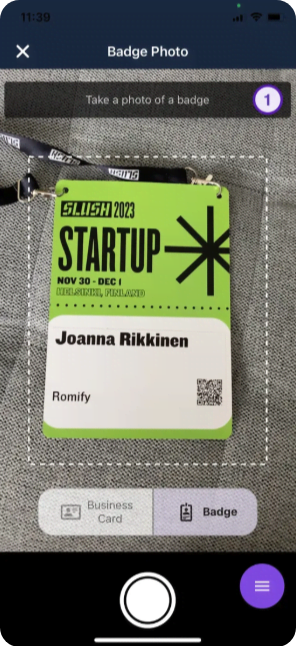
Treat each booth interaction like a mini qualification sprint, starting with Romify’s Badge Scanner. After scanning, ask three to five questions tied to your chosen framework (e.g., role, current tool, main challenge, timing, and project owner). This allows you to capture fit, need, and urgency without turning the chat into an interrogation.
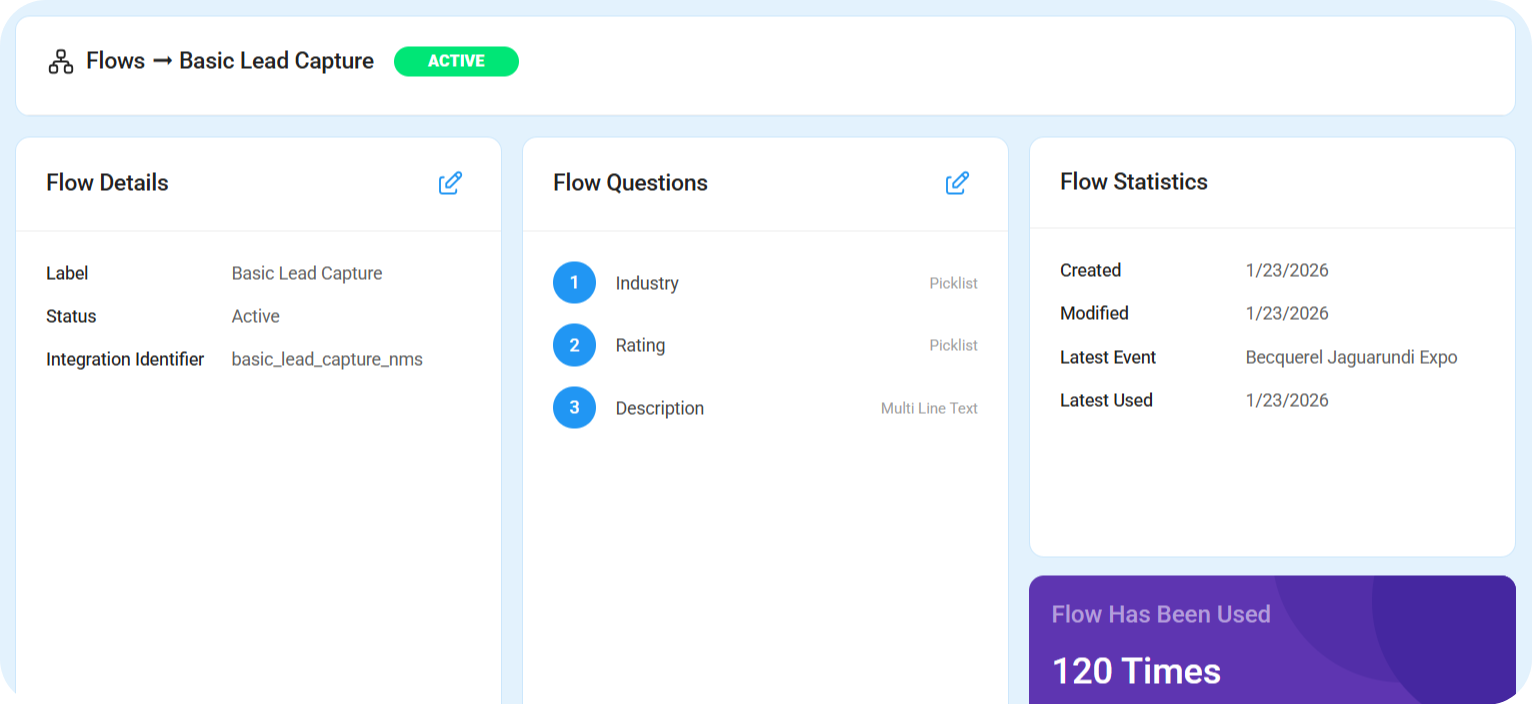
Questions can be created prior to an event using Flows through Romify’s event revenue engine, which then syncs to your CRM, instantly enriching all captured data.
2. Enrich Data in Real Time
While you talk, our AI tool enriches company size, industry, tech stack, and funding stage in the background – so reps don’t have to spend time remembering who was who. This ensures every interaction is backed by complete, accurate context without slowing down the conversation.
3. Route Leads Immediately
With enriched data and qualification in place, you can route outcomes on the spot. Clear-fit leads go directly to an AE, borderline cases move to SDRs for further discovery, and disqualified contacts are sent straight into nurture. This keeps momentum high and prevents leads from slipping through the cracks.
4. Trigger Instant Follow-Up
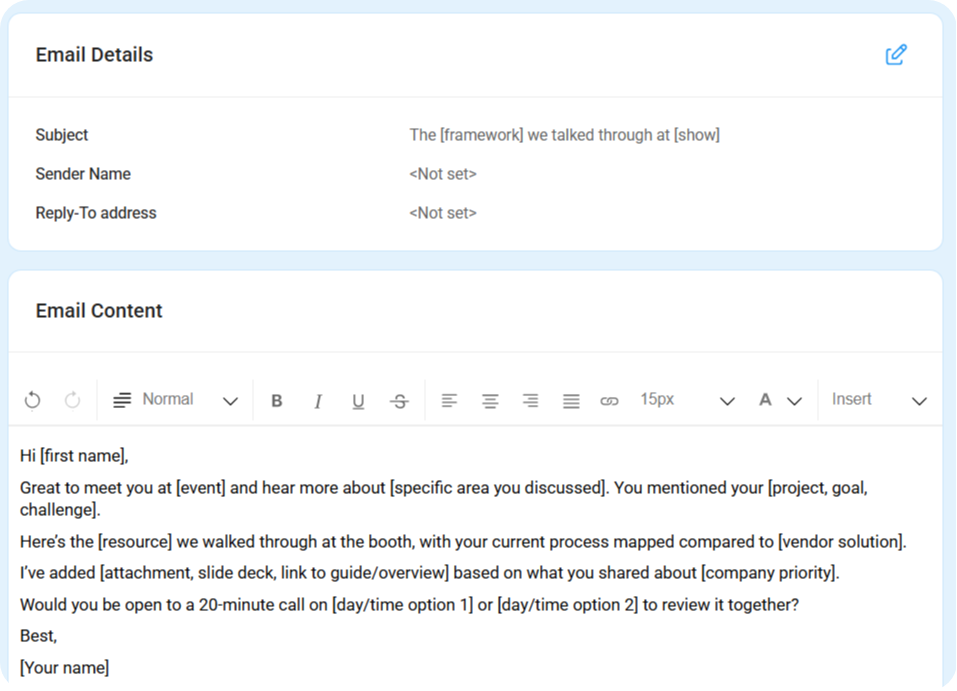
The final step is the kicker. Romify can trigger a personalized follow-up email within about 30 seconds, so the lead leaves your booth and finds you in their inbox while the conversation is still fresh. You can create email templates in the Romify dashboard for hot, warm, and cold leads, quickly fill in any missing details, and send that all-important response without delay.
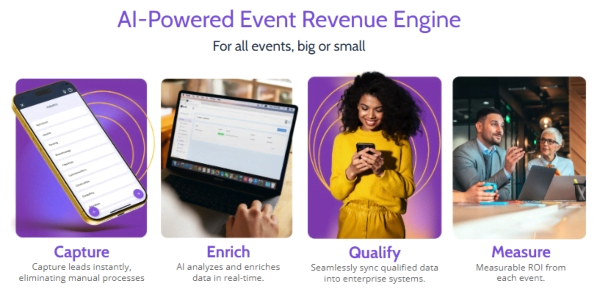
This entire flow – capture, enrichment, routing, and sub‑minute follow-up – is exactly what Romify was built for. If events are a major lead source for you, book a live Romify walkthrough to see it running with your own qualification framework.
Start Qualifying Leads Before the Conversation Ends
The practical move is to automate as much of this as possible so reps can focus on the human part of the conversation. With Romify Flows, booth staff capture badges, answer a few guided questions, and let Romify AI enrich contact data and trigger the right follow‑up instantly.
One major retail customer used this setup to cut speed to lead from roughly two months of manual cleanup to under an hour across high‑volume events. Romify’s event lead generation playbook and speed to lead guide walk through the full motion – from capture to routing to revenue.
For teams running 10+ events a year, request a demo to see what this looks like with your real qualification framework and CRM.