

Many B2B deals spark at events, yet too many leads vanish between the handshake and the CRM. It’s a costly leak, as buyers often choose the first vendor that contacts them. If your data sits trapped in a rental scanner for a week, you’ve already lost to a faster competitor.
Effective event lead generation requires an end-to-end process that closes the gap between the booth and the CRM. This means defining your ICP before the doors open, capturing enriched data mid-conversation, and sending follow-ups while the prospect is still on the floor.
This guide outlines the exact steps to generate, qualify, and track event leads. Get ready to see how easy it is to move from manual chaos to a repeatable revenue engine, with provable event ROMI.
5 Key Takeaways
- Romify is changing the game – going beyond lead capture, our Event Revenue Engine helps your team capture, qualify, synch, follow-up, and track ROI using a single platform.
- Speed is your primary competitive edge – most buyers engage with the vendor who responds first.
- Owning your data infrastructure is safer than renting it – event-agnostic tools ensure you maintain consistent qualification standards across your entire calendar.
- Design branching logic for booth interactions to prevent data fatigue and ensure sales receives a prioritized pipeline.
- Automating the sync between capture and your system of record eliminates manual entry errors that render leads unusable.
Target and Promote Before the Event
Winning starts weeks before the doors open, yet most teams walk onto the floor already behind. Some mistake renting a scanner for having a strategy, and the terms ‘lead retrieval’, ‘lead capture', and ‘lead generation’ are easily confused.
It’s important to note the difference as each describes a different process:
- Lead retrieval is a waiting game where you rely on the organizer’s database and wait for them to hand over your data.
- Lead capture is different because you own the information the second the conversation happens.
- Lead generation is a full-cycle revenue process, which includes lead capture.
Event lead generation is the gold standard because it turns a fleeting handshake into a trackable revenue milestone. This proactive system lets you qualify, enrich, and follow up with a prospect before they even leave the building.
To master it, define your Ideal Customer Profile (ICP) early. This allows you to build qualification questions that filter for budget, authority, and timeline.
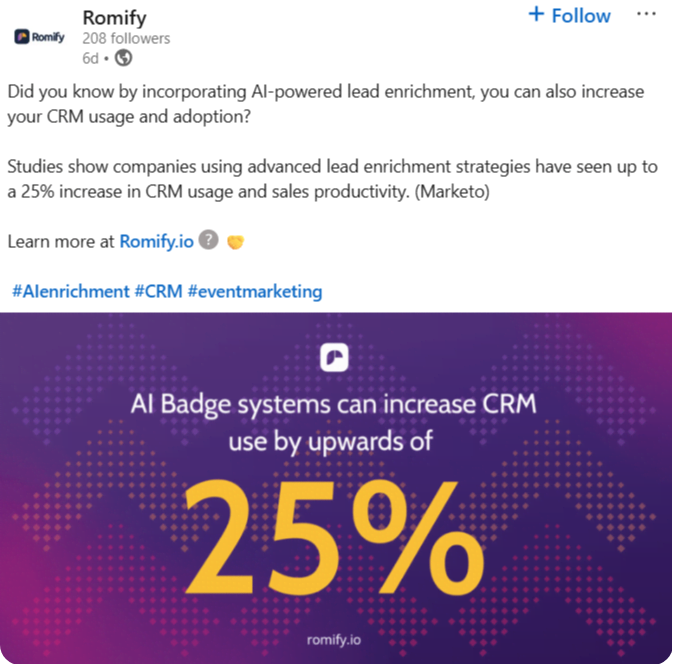
Secondly, use the official hashtag weeks in advance to share setup teasers. Offer exclusive early demo slots to prospects who engage with your LinkedIn posts.
Finally, define metrics upfront. When everyone knows what a win looks like, your booth moves from a cost center to a revenue engine.
Qualification Framework and Team Setup
Face-to-face booth conversations determine if a lead converts or vanishes. To maintain consistency, move away from organizer-specific hardware. Universal lead capture apps like Romify allow your team to use their own smartphones across every event on your calendar. This ‘Bring Your Own Device’ (BYOD) approach eliminates the learning curve associated with different rental scanners at every show.
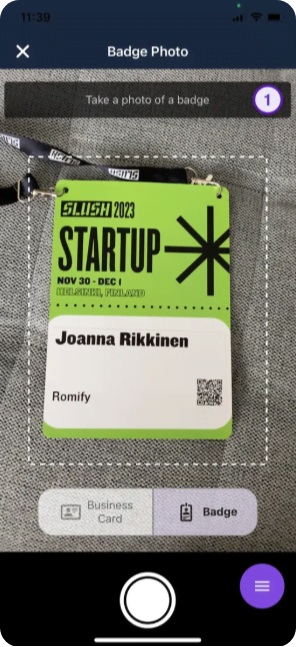
“Prioritize tools with offline-first architecture and AI-powered badge reading. These features ensure you capture data in seconds, even in convention centers with unreliable Wi-Fi. By using a connector tool that integrates directly with your CRM, you can focus on building relationships over fixing hardware. This creates a single trusted system for every event.”
– Amanda M., Director of Events
What to Capture in the Moment
Speed is your greatest asset! Attempting a full discovery session at a noisy booth drives prospects away, so stick to the essential fields to keep convos flowing:
- Contact source: Essential for accurate attribution.
- Role and authority: Helps your sales team prioritize.
- Product interest and timeline: Gauges urgency.
- Consent: A mandatory checkbox for legal compliance.
Detailed questions belong in the follow-up. Collect only what you need to trigger an intelligent second touchpoint. If your flow takes longer than ninety seconds, your staff will skip steps. Focus on capturing the spark of the interaction, then sync that data instantly to your CRM to keep the momentum alive.
Set Clear Team Roles
A crowded booth requires a tactical formation to prevent pipeline leaks. You can divide your staff into specific roles to maintain momentum:
- The Opener handles high-volume ‘hooking’. They scan badges, break the ice, and prime the contact for the next stage.
- The Qualifier acts as the subject matter expert. They take the handoff and run through your brief qualification flow to separate hot leads from casual browsers.
- The Handoff ensures ‘Openers’ can return to the aisle, while ‘Qualifiers’ dive into technical needs – handoffs can be anything from a subtle nod to a change of station.
Design Your Brief Qualification Flow
Your digital flow should act as a guide, so feel free to be flexible. Use adaptive questions that change based on responses. For example, if a lead confirms they have an allocated budget, the next question should pivot to their timeline. If they don’t, ask who controls the decision-making process.
Map these questions to your CRM’s lead scoring model, such as the BANTS framework:
Budget (e.g. 20 points if allocated, 10 if exploring), Authority (e.g. 25 points for decision-maker, 15 for influencer), Need (e.g. 20 points for active pain, 10 for future), Timeline (e.g. 25 points if under 90 days, 15 if 6 months), Solution fit (e.g. 10 points if your product matches their requirements).
Test the flow with practice runs days before the event. Look for any difficult or confusing wording, breaks in flow, or irrelevant questions. Refine your flow before the event to ensure things go as smoothly as possible on the day itself.
Engagement and Capture Tactics
The right mix of engagement and technology determines if leads enter your CRM in 30 seconds or vanish into spreadsheets. Interactive experiences create natural scanning moments, while mobile-first tools eliminate the manual data entry errors that often make event leads unusable for sales teams.
Interactive Booth Experiences
Interactive product demos, where visitors scan a badge to receive personalized results via email, turn a passive walk-by into a qualified lead. Similarly, ROMI calculators providing instant analysis based on visitor inputs give attendees immediate value while providing you with critical qualification signals. Effective lead generation relies on value exchange.
Gamification also creates urgency. Use spin-to-win contests or quizzes that require a quick scan to enter. For those running booth presentations, live polls and Q&A sessions can help you draw a crowd. Displaying real-time results on screens keeps passersby engaged, and provides a natural opening for your team to capture contact data.
Badge Scanning Best Practices
Mobile badge scanning is the fastest way to eliminate typos and manual entry. Your team can use AI-powered OCR to read badge text in seconds. This speed ensures the technology stays in the background of the conversation.
Always prioritize offline-first tools. Convention center Wi-Fi is notoriously unreliable, so your ‘engine’ should store data locally and sync once connectivity returns.
Finally, scan during the conversation. Waiting until a prospect walks away leads to forgotten details and lost data. Capture the info the moment they express interest to stay ahead of competing vendors.
Qualification in Under Two Minutes
Use branching question flows to guide your team through conditional logic. If a prospect lacks an immediate budget, the flow should pivot to ‘Who approves budget?’ rather than asking about a timeline. This keeps the data relevant and the interaction professional.
Our own lead generation app Romify is very intuitive – you can move to the next question by swiping the screen or by tapping the arrow. You can ask questions based on multiple choice, checkbox, multi-line or single-line, dates, numbers, and reference lists.
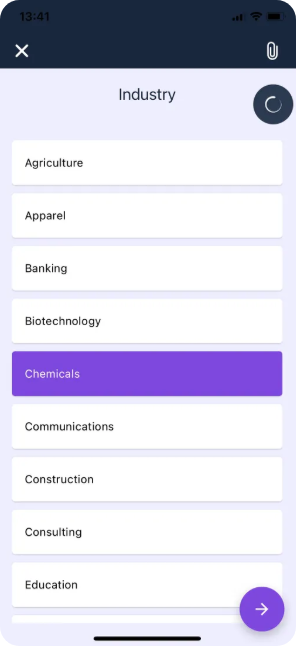
To maintain speed, use tap-to-select answers and dropdown menus instead of typing. Voice dictation is also a powerful tool for capturing nuanced notes without breaking eye contact.
Tag leads immediately as Hot (budget + authority + timeline under 90 days), Warm (exploring solutions), or Cold (future interest only) based on their BANTS score. These temperature tags drive follow-up priority and ensure your sales team tackles the highest-value opportunities first.
Adapt to Any Event Format
While virtual events rely on registration forms and poll participation, physical events require face-to-face qualification. Romify’s universal lead capture allows you to adapt to any setting. Large trade shows prioritize high-volume mobile scanning and quick-fire interactive questions to filter the crowd.
In contrast, networking dinners or executive happy hours focus on relationship building. In these intimate settings, use business card scanning or manual entry after the conversation to maintain a natural flow. Regardless of the format, the goal remains the same:
- Capture the lead.
- Enrich the data.
- Sync it to your CRM immediately to maintain momentum.
Post-Event Follow-Up That Converts
Most pipeline disappears between the booth and the CRM because teams wait days or weeks to reach out. By then, the prospect has forgotten the conversation or signed a deal with a faster competitor. To prevent this, you need a follow-up system built for speed and precision
Establish Follow-Up SLAs
The clock starts the moment the badge is scanned. To maintain momentum, your team needs clear Service Level Agreements (SLAs) based on lead temperature.
- Hot leads: Contact within 24 hours. These prospects have a budget, authority, and a timeline under 90 days.
- Warm leads: Contact within 48 hours. These are prospects exploring solutions without an immediate purchase date.
- Cold leads: Enter these into long-term nurture sequences within 72 hours.
“Defining ‘Hot’ using shared criteria – like the BANTS framework – ensures sales and marketing are aligned on priority. Use qualification data like product interest and urgency to route leads to the right rep immediately. Moving away from random round-robin queues to data-driven routing ensures the most qualified experts handle the highest-value opportunities while the spark of the event is still fresh.”
– Jonathan T., CMO
Segment and Personalize Outreach
A generic ‘Hey, thanks for visiting our booth’ email is the fastest way to get ignored. Effective outreach uses the data captured in the moment to provide immediate value.
For Hot leads, send personalized meeting links and calendar invites within hours of the scan. Your email should reference the specific booth conversation, their stated product interests, and their timeline. This level of detail proves you were listening and positions you as a partner, rather than just one of many vendors.
For Warm leads, focus on education. Deliver content that addresses the specific pain points they mentioned at the booth. Send case studies, ROI calculators, or comparison guides that help them build an internal business case.
Cold leads should enter drip campaigns centered on thought leadership. Instead of a hard sell, offer insights that position your brand as a trusted resource. When they’re ready to graduate to a more active evaluation, your company will be the first one they call.
Automate Without Losing Personalization
Automation should feel like an extension of the conversation – make sure there’s nothing robotic about your responses. Use your qualification data to trigger conditional emails. A prospect tagged ‘Ready now’ can receive a calendar link instantly, while those ‘Evaluating options’ enter a sequence featuring relevant white papers or case studies.
Native CRM synchronization ensures tasks auto-assign to account owners with the full context attached. When a rep opens a lead, they see the event name, specific interest area, and booth notes immediately. This removes the need for background research, allowing your sales team to act while the prospect’s memory of the booth encounter is still fresh.
Close the Feedback Loop
The conversation shouldn’t end when the booth packs up. Send post-event surveys to gauge attendee needs and refine your next steps. Ask what they learned and what information they are missing to move forward. This data helps your team adjust booth strategies for future shows.
To maintain engagement, host exclusive post-event webinars, and invite only the qualified leads who expressed interest in specific topics at the booth. This provides a natural transition from a brief floor chat to a deep-dive technical discussion, keeping your brand at the center of their evaluation process.
Track Pipeline to Closed Revenue
Proving the value of your event spend requires moving beyond vanity metrics like “total scans”. Use UTM parameters and CRM source fields to link every lead to the specific show that generated it. This allows for multi-touch attribution, giving marketing credit for the initial spark that eventually leads to a deal.
Calculate your cost-per-opportunity by dividing the total event investment by the qualified pipeline generated. Your admin hub should generate reports showing the CFO exactly how much revenue each event contributed within 30, 60, and 90 days. When you can point to closed revenue instead of a stack of business cards, you transform the event from a line item into a high-performance revenue engine.
Romify: The Event Revenue Engine That Works Everywhere
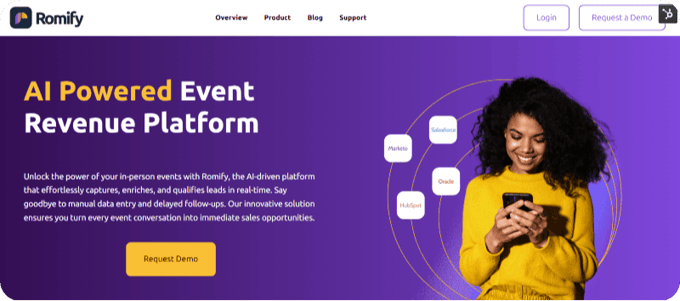
Most event tech fails when it hits the real world. Organizers often lock data behind expensive APIs, and 80% of events lack them entirely. Romify bypasses these problems. Our event-agnostic architecture uses AI-powered OCR to capture data at any event without needing a single integration from the organizer.
Everything is then saved to your Romify hub dashboard, where you can monitor events, leads, users, flows, and more – from a single screen.
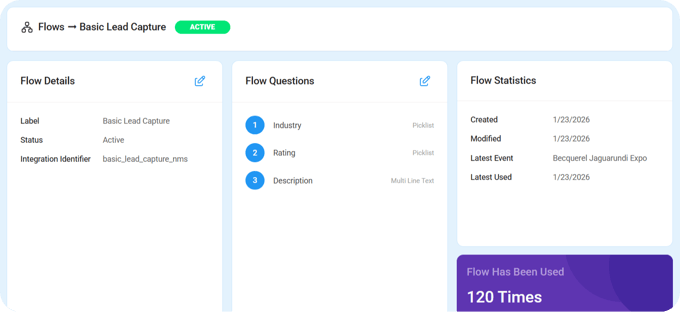
Our revenue engine is built for the chaos of the show floor! Romify gives you a host of lead capture methods, so all potential options and eventualities are covered. These include scanners for a business card, badge (AI), digital business card, badge (QR) and manual entry.
List capture methods include the event guest list and known contacts list, and each method comes with a multitude of settings, including name, company, email, and many more:
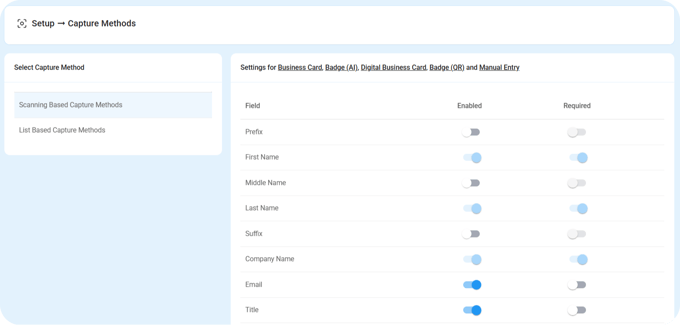
Connectivity blackouts are common, so Romify uses offline-first capture. Your data stays safe on the device and syncs the moment the Wi-Fi returns. And setup is quick and easy, as implementation takes under three hours across three calls. It feels like connecting a simple utility, yet it delivers the power of a full-scale revenue engine.
Qualification Flows That Run in Under Two Minutes
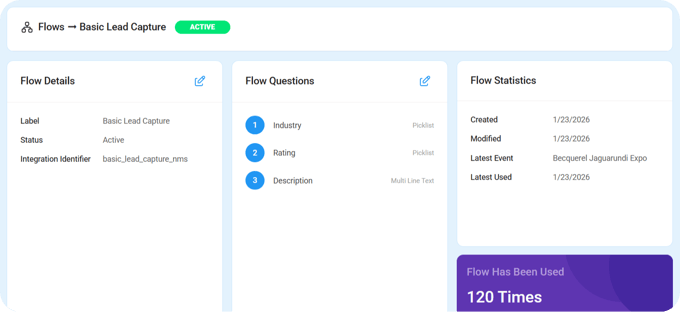
Romify Flows ensures your booth staff collect high-quality data without breaking the conversational rhythm. The interface guides reps through branching questions using tap-to-select answers, so there’s no need to type long paragraphs while a prospect is standing in front of you.
The logic is adaptive. If a prospect mentions they have no budget, the flow immediately branches to ask who holds the purse strings. This prevents awkward, irrelevant questions about timelines.
Because these dropdowns and checkboxes map directly to your CRM fields, you never have to guess what a cryptic note like ‘Interested?’ meant three weeks later. If you do need more detail, voice dictation captures nuanced context while you maintain eye contact with the prospect.
AI Enrichment and Duplicate Prevention
Manual data entry is where pipeline goes to retire. Romify AI effortlessly appends missing details in seconds. Our Natural Language Processing (NLP) is sharp enough to distinguish job titles from company names, even on cards with complex or creative layouts.
This works globally. With business card translation for 60 languages and a BYOD approach, your team can operate anywhere in the world with zero hardware costs. And to keep your database clean, our duplicate detection checks your existing Salesforce, HubSpot, or other CRM records before creating anything new. Instead of spawning clones, it updates existing records with the latest event interaction, so your CRM remains a single source of truth.
Instant CRM Sync and Automated Follow-Up
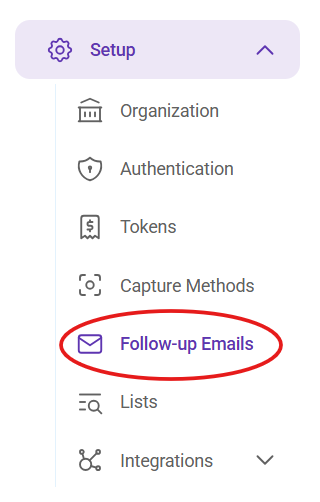
The real speed to lead advantage comes from instant activation. Leads sync to your CRM in real time, and if a prospect is ‘Ready now’, Romify can trigger a personalized follow-up email with a meeting link in under 30 seconds – often before they’ve even left your booth. You can create these via Setup > Follow-up Emails, and build email templates linked to flows.
If they’re in the ‘Evaluating’ stage, they’re automatically placed into the correct nurture sequence. CRM tasks are assigned to the right account owners with full context – the event name, interest area, and specific notes.
For enterprise teams, our pre-built integrations and Brussels-based data storage ensure you meet strict GDPR and data sovereignty requirements without extra configuration.
Take Full Command of Your Event Leads This Week
Take back control of your event leads by starting with your next show – define your ICP, build a qualification flow, and lock in follow-up SLAs with your sales team.
Map your current process to find the waste. Look at where leads sit today – is it in a rental scanner, a spreadsheet, or a stack of cards? Calculate exactly how many days pass before a salesperson actually opens a record – those days are lost revenue.
As we’ve seen, best results come from abandoning manual entry and disconnected tools. Premium event lead generation comes from a world with no more scanners, no more spreadsheets, and no more delays.
Request a Romify demo today to see how leading teams stop losing leads and start turning event conversations into a qualified pipeline in 30 seconds instead of 30 days.
FAQs
What specific technologies and apps are recommended for scanning and managing leads at in-person events?
Skip the rented hardware and use universal lead capture apps that work at any event, regardless of the organizer. Look for mobile-first tools featuring offline-first capture, real-time CRM sync, and built-in qualification flows. This ‘Bring Your Own Device’ (BYOD) approach allows your team to master one single system for your entire event portfolio, ensuring consistent data across trade shows, dinners, and networking sessions.
How can event partnerships be used to increase lead generation reach?
Collaborate with complementary vendors who serve the same audience but do not compete with your product. You can co-market the booth to share foot traffic and split costs. Using partnerships often provides access to broader attendee lists for pre-event outreach, doubling your reach and ensuring a steady stream of qualified prospects before the doors even open.
What are the most common challenges companies face with event lead generation?
Most organizations struggle with three core issues:
- Slow follow-up: Leads often go cold because teams must wait days or weeks for organizer data exports.
- Poor data quality: Manual entry leads to typos, missing emails, and incomplete records that make prospects unusable.
Broken handoffs: Marketing captures the data, but sales never receives the context regarding the prospect’s specific needs or urgency.