

CFOs and stakeholders need clear proof that events generate pipeline, and this doesn’t come from lead counts captured in spreadsheets. Speed provides the ultimate advantage, and vendors who can capture in-depth info and follow up promptly tend to win at sales.
Once leads disappear into spreadsheets and ad hoc forms, you lose the details that made the conversation valuable in the first place. This approach might suffice for one or two events a year, but those running ten, twenty, or fifty shows need a far more capable solution.
Let’s dive into how modern event revenue engines capture, enrich, and sync leads in seconds, so every event becomes traceable, repeatable, and easier to justify.
5 Key Takeaways
- The real trade show challenge is found in moving clean, structured data into your CRM of choice such as Salesforce or HubSpot, fast enough for prompt, effective follow-up.
- Universal lead capture apps remove organizer dependencies, so your team can use the same workflow at every event instead of relearning tools each time.
- Offline-first mobile apps beat rented scanners and web forms because they keep capturing during WiFi failures and sync automatically when you are back online.
- Event-level attribution depends on more than a Trade Show source tag – you need event objects and CRM integrations that link each scan to pipeline and revenue.
- Romify’s combination of universal capture, instant enrichment, and flexible CRM sync delivers the speed and data needed to prove Return On Marketing Investment (ROMI).
What Modern Lead Capture Software Does
Modern event lead tools act as an engine between your booth and your CRM. They capture leads at any event without waiting for organizer integrations, keep working when WiFi collapses, and activate follow-up within minutes.
That combination of universality, resilience, and speed is what turns trade show traffic into trackable revenue.
Universal Capture Eliminates Event Restrictions
Universal lead capture means your team can scan badges, cards, or anything with text at any trade show – without needing the organizer’s hardware or APIs. Most events never give exhibitors direct API access to registration data, so relying on organizer-approved scanners locks you into one-off workflows that break from show to show.
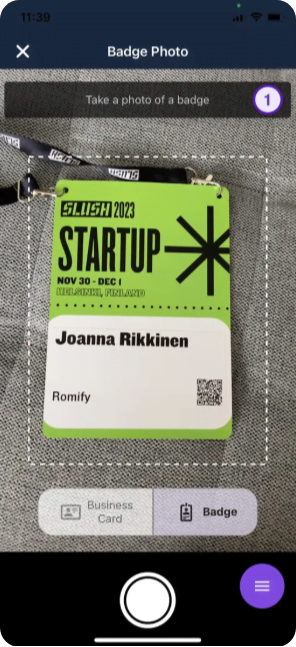
“Universal apps do away with such inconveniences. They use AI to read badge text or barcodes on any device, then create new, enriched contact records through badge scans, business cards, or quick manual inputs. This all happens in a single interface that stays consistent across your entire event calendar.”
– Holly S., Event Planner
Offline Capture Prevents Data Loss
You don’t want your best conversation of the day to die because of a convention center WiFi hiccup. Large venues are notorious for patchy connectivity thanks to steel, concrete, and thousands of devices fighting for the same signal. Web forms that depend on live server validation will error out or lose submissions the second that connection drops.
Offline-first event apps prevent any technical frustrations. They store scans and qualification data locally on the device, then sync to your CRM as soon as a stable connection returns. You still need an internet connection to pull deep CRM history in real time, but capturing net-new leads no longer depends on having perfect WiFi.
Speed Determines Conversion Rates
On a busy show floor, speed starts at the booth! Scanning a badge and tapping a few qualification fields takes seconds, while asking someone to type into a tablet form eats up minutes and kills throughput.

However, the real conversion hit comes after the show. Every 24 hours a lead sits in a spreadsheet instead of your CRM, interest fades, details get fuzzy, and competitors have space to follow up first.
Stacks of business cards also create compliance headaches because it’s harder to prove consent – or control how that data is stored and shared. Modern tools can include consent fields in the capture flow and trigger compliant, trackable outreach as soon as the record syncs.
Comparing Event Lead Capture Approaches
Event lead capture has moved from rented hardware to universal event revenue engines, an approach that gives you sovereign data ownership.
When you use rented hardware, you’re essentially buying back your own booth traffic data. A universal engine ensures that captured data lives inside your infrastructure, protected by your security protocols, and governed by your own data retention policies.
The right choice for lead capture comes down to three axes:
- Cost per event
- Where and how the tool works
- How clean the data looks once it hits your CRM
Mobile apps win hands-down as they remove per-event rental fees, enable offline capture, and push leads straight into Salesforce or HubSpot with no copy/pasting or spreadsheets required.
At a glance, here is how the main models compare.
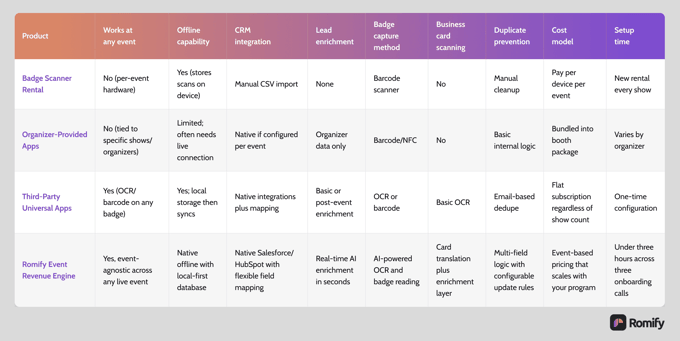
For some real-life context, badge scanners still work if you run a couple of shows a year and just need a basic list. But universal apps raise the bar with consistent workflows and OCR-based badge reading that your team controls, rather than the organizer.
“Romify pushes this concept further. Our solution layers AI enrichment, offline-first capture, and instant CRM sync on top of universal capture, so follow-up starts immediately – gone are the days of having to manually collate your leads on the evening after an event.”
– Casey, Event Leader
The best modern setups move beyond merely scanning. Reading a barcode is one thing, but true worth comes in an app’s ability to enrich that barcode with qualification context and route it without human intervention.
Improving Your Workflow To Close Deals Faster
The fastest event teams treat lead capture as the first step in a revenue workflow – the right software enables a totally different philosophy. Tight qualification flows, clean CRM integrations, and event-level attribution form a single system that turns booth conversations into a forecastable pipeline and defensible ROMI.
Build Qualification Flows That Speed Follow-Up
Every captured lead should include four non-negotiables:
- Name
- Company
- At least one qualification signal so sales knows how to respond
Mobile-first flows keep this speedy by replacing long text fields with tap targets, checkboxes, and branching questions that match how the conversation actually unfolds. Voice dictation for notes adds another layer of context, as reps can capture needs, objections, and next steps in real time without having to glance down at a keyboard or break eye contact mid-pitch.
Maintain CRM Integrity While Enabling Pipeline Attribution
Modern event lead apps like Romify, iCapture, and Cvent LeadCapture connect directly to the likes of Salesforce and HubSpot, so captured fields flow straight into your routing, scoring, and nurture workflows. Every qualification answer and event detail is stored in structured CRM properties, which then trigger the right owner assignment, alerts, and sequences automatically.
You can also configure duplicate rules so that, when someone is scanned at multiple events, their existing contact record is updated instead of creating a brand new record each time. That keeps one clean timeline for each person, showing every event they attended and every interaction they had with your team.
Our app also shows which salesperson the contact interacted with, and total contacts made – super useful for calculating the worth of attending an event.
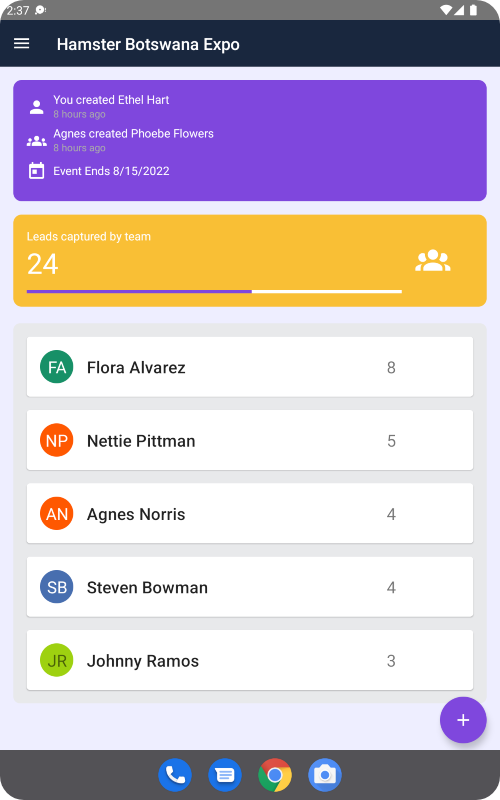
When those leads are linked to specific marketing event records, you maintain precise attribution for each individual show instead of lumping everything into a vague (e.g. ‘Portland Event’) source field that finance cannot use for real ROMI analysis.
Compliance and Consent
Amid ever-tightening GDPR and CCPA regulations, Romify integrates digital consent directly into the capture flow. You can configure mandatory opt-in checkboxes or digital signature fields that are timestamped and synced as part of the lead record.
This creates an audit trail of how and when consent was granted, protecting your brand and ensuring your sales team only calls prospects who have invited the conversation.
Prove Which Events Generate Revenue Through Attribution
Once capture and sync are handled, the focus shifts to proof. Real-time dashboards tied to your event engine show live lead volume, qualification breakdown, and rep activity while the show is still running. Pipeline attribution then connects each scanned badge to opportunities and closed revenue, giving you ROMI at the event, region, and program level instead of a single blended guess.
Marketing leaders back at headquarters can watch performance as it happens and shift staff, messaging, or follow-up plays based on data. Finance teams and stakeholders can be given clear evidence of which events deserve expansion and which should lose budget next year.
How Romify Delivers Effortless Event Revenue at Scale
Romify functions as an event revenue engine. It combines AI-powered capture, real-time data enrichment, and flexible CRM sync so your team can move from conversation to follow-up in minutes.
Romify AI Captures Leads at Any Event
Romify AI uses Optical Character Recognition (OCR) to read printed badge details, so your team is not blocked by organizer APIs or limited scanner devices. The same engine translates business cards in over 60 languages and converts them into structured contact records before syncing to your CRM.
Traditional OCR often struggles with stylized fonts or low-light booth conditions, leading to unusable data. Romify’s engine uses a multi-pass AI verification process. If a badge scan is obstructed or a business card has a complex layout, the system flags the record for a quick human-in-the-loop verification. This ensures accuracy rates are maintained even when your physical environment poses a challenge.
Offline-first architecture stores every scan and note locally, then syncs when connectivity returns, avoiding the failures common with web-based forms on shaky convention-center WiFi. AI accelerates capture and enrichment, but admins still design qualification flows and review edge cases, especially for strategic accounts and complex deal cycles.
Enrichment That Eliminates the ‘Post-Event Slump’
Romify appends firmographic and contact data such as company size, industry, LinkedIn profile, and direct phone within seconds of capture. Badges that only show a name and company become sales-ready profiles without the post-event “who was this again?” scramble that wrecks sales’ momentum. Reps are not stuck researching basic facts for days.
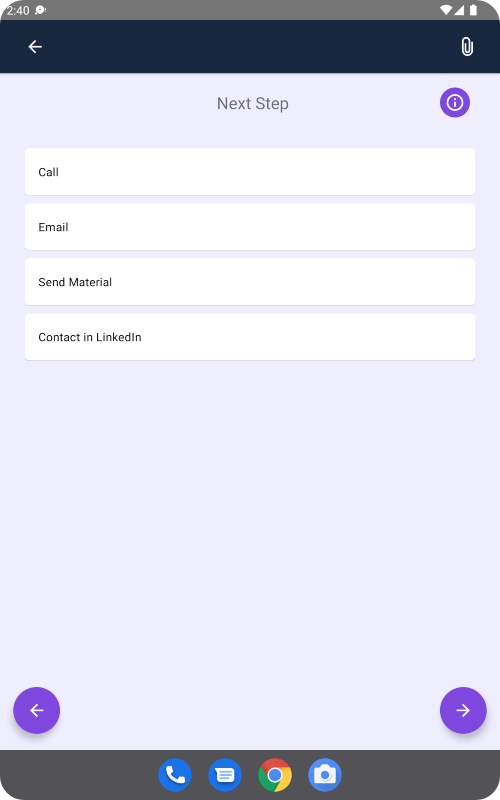
Enrichment is most accurate for B2B domains because corporate email addresses map cleanly to trusted company data sources. While many tools batch-enrich in hours, Romify keeps enrichment inside the capture workflow, enabling reps to start follow-up from the airport instead of on Monday morning.
This same pipeline enables instant “Great to meet you” email within 30 seconds of capture – reaching prospects while the booth conversation is still fresh in their minds.
CRM Sync That Gives You Complete Control
Romify connects to CRMs with flexible field mapping. Every answer in your qualification flow can land in the right property and trigger routing, scoring, and nurture workflows automatically. You decide which questions create tasks, which assign owners, and which drop leads into sequences, instead of working with spreadsheets and manual imports.
Duplicate prevention rules use fields like email and company to update existing contacts when someone visits multiple events, so there’s no need for a new record every time their badge is scanned. This preserves one clean timeline per person while still logging each event touchpoint.
Any interactions are then associated with event-level objects, which lets you report pipeline and revenue per show. The result is proper lead management, instead of dumping everything into a single offline bucket that’s of no use for ROMI calculations.
Be aware that Salesforce customers do need an edition with API access, such as Enterprise or higher, so Romify can create and update records rather than relying on manual CSV uploads. Meanwhile, native HubSpot tools can push event leads in as generic offline sources or via imports, which makes granular event attribution harder unless you add a dedicated event layer like Romify on top.
Prove ROMI in One Pilot
As we’ve seen, you don’t need a huge rollout to prove whether events deserve their budget. One well-defined pilot at a single show can demonstrate if your event engine captures enough qualified pipeline, fast enough, to satisfy your CFO.
Speed is the ultimate test. While legacy processes wait days for CSVs and cleanup, Romify captures, enriches, and syncs leads in minutes, tying every badge back to opportunities and closed revenue. You can even set success criteria before the show – speed-to-lead, pipeline created, revenue attributed – then let the data decide when it’s time to scale.
Ready to see it in action? Request a demo to walk through the workflow, or launch a one-event pilot and measure the results for yourself.